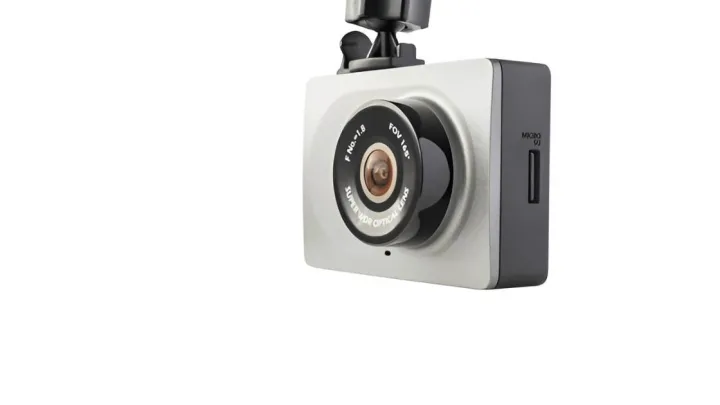
What You’ll Need
Basic setup (most installs):
-
Dash cam + mount (adhesive or suction)
-
High-endurance microSD card (recommended for dash cams)
-
Microfiber cloth + glass cleaner (or alcohol wipe)
-
Cable clips or adhesive cable holders
-
Plastic trim tool (optional but helpful)
If hardwiring (optional):
-
Hardwire kit (often includes fuse taps)
-
Fuse taps (add-a-fuse) matching your fuse type (mini/low-profile/ATO)
-
Basic hand tools
-
Low-voltage cutoff module (often built-in to quality kits)
Step-by-Step: Attach & Install a Dash Cam (Clean + Reliable)
Step 1: Pick the best mounting spot
For most cars, the best spot is:
-
High on the windshield
-
Centered (or slightly passenger side)
-
Behind the rearview mirror so it’s hidden and doesn’t distract you
This location gives:
-
A wide, stable view of the road
-
Less glare and reflections
-
Better coverage in accidents
Avoid: low windshield areas, blocking sensors, or placing it where it obstructs your view.
Step 2: Clean the mounting area properly
Adhesive failures happen because of dirty glass.
-
Wipe the glass with an alcohol wipe (or glass cleaner)
-
Dry completely
-
Don’t touch the cleaned area with fingers afterward
Step 3: Choose your mounting method (adhesive vs suction)
Adhesive Mount (best for long-term use)
Pros: strongest hold, cleaner look, less vibration
Cons: harder to reposition
How:
-
Stick mount to cleaned glass
-
Press firmly for 30–60 seconds
-
Let it cure (ideal: a few hours) before driving if possible
Suction Mount (best if you want adjustability)
Pros: easy to move, great for testing angles
Cons: can loosen with heat/cold over time
How:
-
Wetting the suction cup lightly can improve grip
-
Press and lock the suction lever
-
Tug gently to confirm it’s secure
Step 4: Route the power cable (hide it neatly)
A clean install is mostly cable routing.
Fast method (works for most cars):
-
Tuck the cable into the headliner
-
Run it along the top edge toward the A-pillar
-
Continue down toward the dashboard/12V socket
Use a trim tool to tuck the cable without damaging panels.
Step 5: Power it (choose the best option)
Option A: Use the 12V/cigarette lighter socket (easiest)
Best if you want quick installation with no electrical work.
-
Plug the adapter into the 12V socket
-
Hide extra cable with clips
-
Turn the car on and confirm it powers up
Tip: If your socket is always on (even when car is off), your dash cam may keep running. If that’s not desired, use an ignition-switched socket or choose hardwiring.
Option B: Hardwire kit (cleanest + parking mode)
Best if you want:
-
No dangling wires
-
Parking mode recording
-
More professional look
Basic concept:
-
Connect one wire to ACC (ignition-on)
-
Connect one wire to constant power (battery)
-
Ground to bare metal
-
Use a kit with low-voltage cutoff to help prevent battery drain
If you’re not comfortable working with fuses, a professional install is worth it.
Safety First: Avoid Airbag Interference (Very Important)
When routing cable near the A-pillar:
-
Keep wires behind trim but not in the airbag deployment path
-
Never route cable across the airbag cover area
-
If unsure, route toward the passenger side or consult your vehicle manual
A clean install should never compromise safety systems.
Best Dash Cam Angle & Settings (AEO-ready)
Best viewing angle
-
Horizon roughly in the middle of the frame
-
Capture both lanes and the hood edge slightly (optional)
-
Avoid pointing too high (misses plate-level detail) or too low (misses distance)
Must-set settings in 2026
-
Resolution: 1080p minimum (1440p/4K if supported and stable)
-
Loop recording: ON (1–3 minute clips)
-
G-sensor: Medium (too high can lock too many files)
-
Date/time: Correct (important for insurance)
-
Parking mode: Only if hardwired + cutoff protection
-
Audio recording: Check local rules and personal preference
SD Card Tips (Most Dash Cam “Problems” Start Here)
Use a high-endurance microSD card. Standard cards often fail faster because dash cams continuously overwrite footage.
Best practice:
-
Format the card in the dash cam once a month
-
Replace if you see “card error,” missing clips, or random freezes
Common Mistakes to Avoid
-
Mounting too low or blocking the driver’s view
-
Sticking adhesive to dirty glass (falls off later)
-
Routing cable through airbag path
-
Using cheap SD cards (recording errors)
-
Forgetting to set date/time (weakens evidence)
-
Setting G-sensor too sensitive (locks everything)
Basic Legal & Privacy Notes (USA-friendly, non-legal advice)
Dash cams are widely used in the U.S., but rules can vary by state and situation.
General best practices:
-
Don’t obstruct your view through the windshield
-
Avoid recording private conversations without consent (audio laws vary)
-
If you drive for work (rideshare, delivery), check company policy
Quick Troubleshooting (Fast Answers)
Dash cam won’t turn on: check adapter, cable, and try another 12V socket
Keeps restarting: SD card may be failing or power supply unstable
Footage is blurry: clean lens + adjust angle + check windshield glare
Overheating: avoid direct sun exposure, consider a heat-rated model
Parking mode drains battery: use low-voltage cutoff or disable parking mode
Conclusion
Attaching a dash cam is simple when you follow the right order: choose the best windshield location, use a secure mount, power it safely, hide the cables away from airbags, and finish by optimizing the angle and settings. With a high-endurance SD card and basic monthly maintenance, your dash cam becomes reliable evidence, security, and peace of mind every time you drive.
Frequently Asked Questions (FAQ)
Where is the best place to mount a dash cam?
The best place is high on the windshield behind the rearview mirror, centered or slightly passenger side, so it records the road clearly without blocking the driver’s view.
Is adhesive or suction better for mounting a dash cam?
Adhesive mounts are best for long-term stability and less vibration. Suction mounts are easier to reposition but may loosen in extreme heat or cold.
Can I install a dash cam without hardwiring?
Yes. You can power it using the 12V/cigarette lighter socket, which is the simplest plug-and-play installation method.
Do I need a special SD card for a dash cam?
A high-endurance microSD card is recommended because dash cams record continuously and standard cards can wear out faster or cause recording errors.
How do I hide dash cam wires safely?
Route the cable along the headliner and trim panels using clips or a trim tool, and keep wires away from airbag deployment areas, especially near the A-pillar.
Will a dash cam record when my car is parked?
Only if the dash cam supports parking mode and has power while parked, typically through a hardwire kit with low-voltage cutoff protection.
Why does my dash cam keep restarting or freezing?
This is often caused by a failing or incompatible SD card, unstable power supply, or a card that needs formatting inside the dash cam.
Is it legal to use a dash cam in the USA?
Dash cams are widely used in the U.S., but state rules can vary for windshield mounting and audio recording. Avoid blocking your view and follow local laws.
Disclosure
Some links may be affiliate links. That means we may earn a small commission at no extra cost to you.