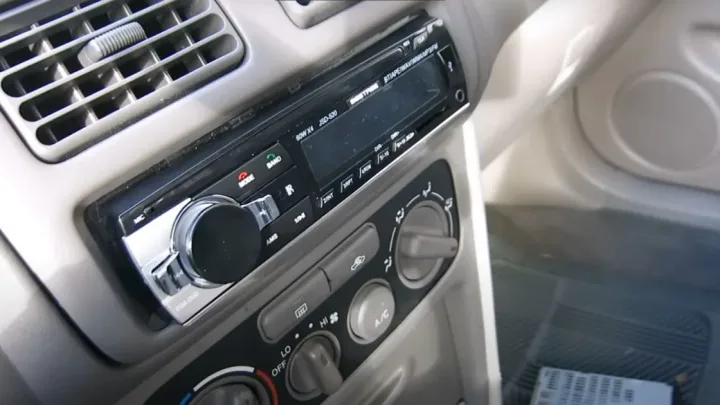
At-a-Glance: Tools, Parts, Time
Time: 30–120 minutes
Difficulty: Easy to Medium
Typical DIY cost: Low to Moderate (radio + install parts)
Tools you’ll likely need
-
Trim removal tool (plastic preferred)
-
Phillips/flat screwdriver
-
Socket set (common sizes vary)
-
Wire stripper/crimper
-
Heat-shrink + heat gun (recommended) or quality butt connectors
-
Electrical tape (for finishing, not as the only “fix”)
Parts that make installs easier (and cleaner)
-
Dash kit (helps fit single-DIN/double-DIN properly)
-
Wiring harness adapter (prevents cutting factory wires)
-
Antenna adapter (common cause of “no reception” if missing)
-
Optional: steering wheel control module
-
Optional: factory amp integration module (Bose/JBL/premium systems)
Safety First
1) Disconnect the battery
Disconnect the negative (-) terminal before touching wiring. This reduces risk of shorts, blown fuses, and airbag-related issues in some dashboards.
2) Work carefully around trim and airbags
Use plastic trim tools, don’t force clips, and avoid pulling aggressively near airbag-marked areas.
Step 1: Confirm Fit and Compatibility (Do This Before You Remove Anything)
This is where most installs go wrong.
Check these three things:
-
Radio size: single-DIN, double-DIN, or floating-screen style
-
Vehicle-specific fit kit: dash kit recommended for OEM look
-
Wiring needs: harness adapter, antenna adapter, and optional interfaces
Pro tip: If your car has a premium sound system (Bose/JBL/Infinity), you may need an interface module to avoid low volume, missing channels, or weird fading issues.
Step 2: Remove the Old Car Radio
Detach the trim panel
-
Use a trim tool to gently pry around the radio bezel.
-
Work slowly to avoid breaking clips.
-
Set trim pieces aside in a safe spot.
Remove mounting screws/bolts
-
Unscrew the factory radio brackets.
-
Pull the radio out carefully.
Unplug connectors
-
Unplug the main wiring harness (press the tab and pull straight).
-
Disconnect the antenna cable.
Step 3: Prepare the Wiring the Right Way (Clean, Reliable, No Headaches)
Use a wiring harness adapter (strongly recommended)
A harness adapter lets you connect the new radio without cutting factory wiring.
Match wires by function (common color guide)
| Wire Color (Common) | Function |
|---|---|
| Yellow | Constant 12V (memory) |
| Red | Accessory 12V (ignition) |
| Black | Ground |
| Blue/White | Amp remote turn-on |
| Blue | Power antenna (if used) |
| Orange/White | Illumination/dimmer (varies by car) |
| White / White-Black | Front left speaker +/- |
| Gray / Gray-Black | Front right speaker +/- |
| Green / Green-Black | Rear left speaker +/- |
| Purple / Purple-Black | Rear right speaker +/- |
Important: Some vehicles don’t follow aftermarket color logic on the vehicle side. That’s why the adapter harness matters.
Best practice connection methods
-
Best: solder + heat shrink
-
Very good: crimp connectors + heat shrink
-
Avoid: twisting wires and wrapping tape only (often fails over time)
Step 4: Install and Mount the New Radio
Dry-fit first
-
Attach the dash kit to the radio (if needed).
-
Confirm the face sits flush and doesn’t bind.
Connect everything
-
Plug harness adapter into the car
-
Plug harness into the radio
-
Connect antenna adapter (if needed)
-
Plug in USB mic / backup camera lead (if applicable)
Secure the unit
-
Screw radio/brackets firmly
-
Make sure it doesn’t wiggle (wobble causes rattles and intermittent wiring issues)
Step 5: Test Before Reassembly (Saves You Time)
Reconnect the battery negative terminal, turn ignition to ACC, then check:
Quick test checklist
-
Powers on/off properly
-
AM/FM reception works (no heavy static)
-
All speakers play (front/rear, left/right)
-
Balance/fade works correctly
-
Bluetooth pairs and plays audio
-
USB charges/reads (if used)
-
Reverse camera triggers (if installed)
If something is wrong, troubleshoot now before the trim goes back on.
Step 6: Reassemble the Dashboard
-
Snap trim back carefully, align clips first
-
Replace any screws
-
Confirm no gaps, no loose pieces
Troubleshooting: Fix Common Problems Fast
Radio won’t turn on
-
Check the radio fuse and vehicle fuse
-
Verify yellow (constant 12V) and red (ACC) are correct
-
Confirm ground is solid (paint-free metal point if grounding manually)
No sound but radio turns on
-
Factory amp may need an amp integration module
-
Blue/white remote wire may be required for amp turn-on
-
Speaker wires might be loose or mis-paired
Static or weak reception
-
Missing antenna adapter is common
-
Antenna cable not seated fully
One speaker not working
-
Inspect that speaker pair wiring (+/-) is correct
-
Check for pinched wires behind the radio cage
Buttons/controls acting weird
-
Some vehicles require an interface module for data-bus systems
-
Reset the head unit (factory reset option in settings)
Pro Tips for a Cleaner, OEM-Looking Install
-
Use a vehicle-specific dash kit for proper fit and less vibration
-
Bundle wires neatly and keep them away from sharp edges
-
Don’t cram wires behind the radio. Make a “wire pocket” to the side if possible
-
Use foam tape on brackets if your dash tends to rattle
When to Consider Professional Installation
DIY is great, but get help if:
-
Your vehicle has a premium factory amp system and you’re unsure about interfaces
-
You’re adding multiple components (amp, subwoofer, DSP, cameras)
-
You see airbag warnings or you’re working near complex dash wiring
Frequently Asked Questions (FAQ)
Can I install a car stereo myself?
Yes. Most vehicles allow DIY installation using the right dash kit and wiring harness adapter, plus careful testing before reassembly.
What do I need to install a radio in my car?
You typically need a compatible radio, a vehicle-specific dash kit, a wiring harness adapter, and sometimes an antenna adapter or steering wheel control interface.
Can you put any radio in any car?
Not always. Compatibility depends on radio size (single-DIN/double-DIN), wiring connectors, factory amp systems, and dash fit requirements.
Do you need a dash kit to install a car radio?
Often yes. A dash kit helps the radio fit properly, prevents gaps, and improves stability for an OEM-like finish.
Why does my radio turn on but I have no sound?
Common causes include factory amp integration needs, missing amp turn-on signal (blue/white wire), or incorrect speaker wiring connections.
How long does it take to install a car radio?
Most installs take 30–120 minutes depending on vehicle dash design and whether you add steering wheel control or factory amp interfaces.
Disclosure
Some links may be affiliate links. That means we may earn a small commission at no extra cost to you.